Skills = the playbook
Reusable, plain-markdown guides that tell an agent how to do a kind of task.
Loaded into the current conversation only when relevant.
Agents = the workers
Narrow sub-agents (“diggers”) that read a heavy source in their own context and
hand back a tight answer — keeping the main conversation clean.
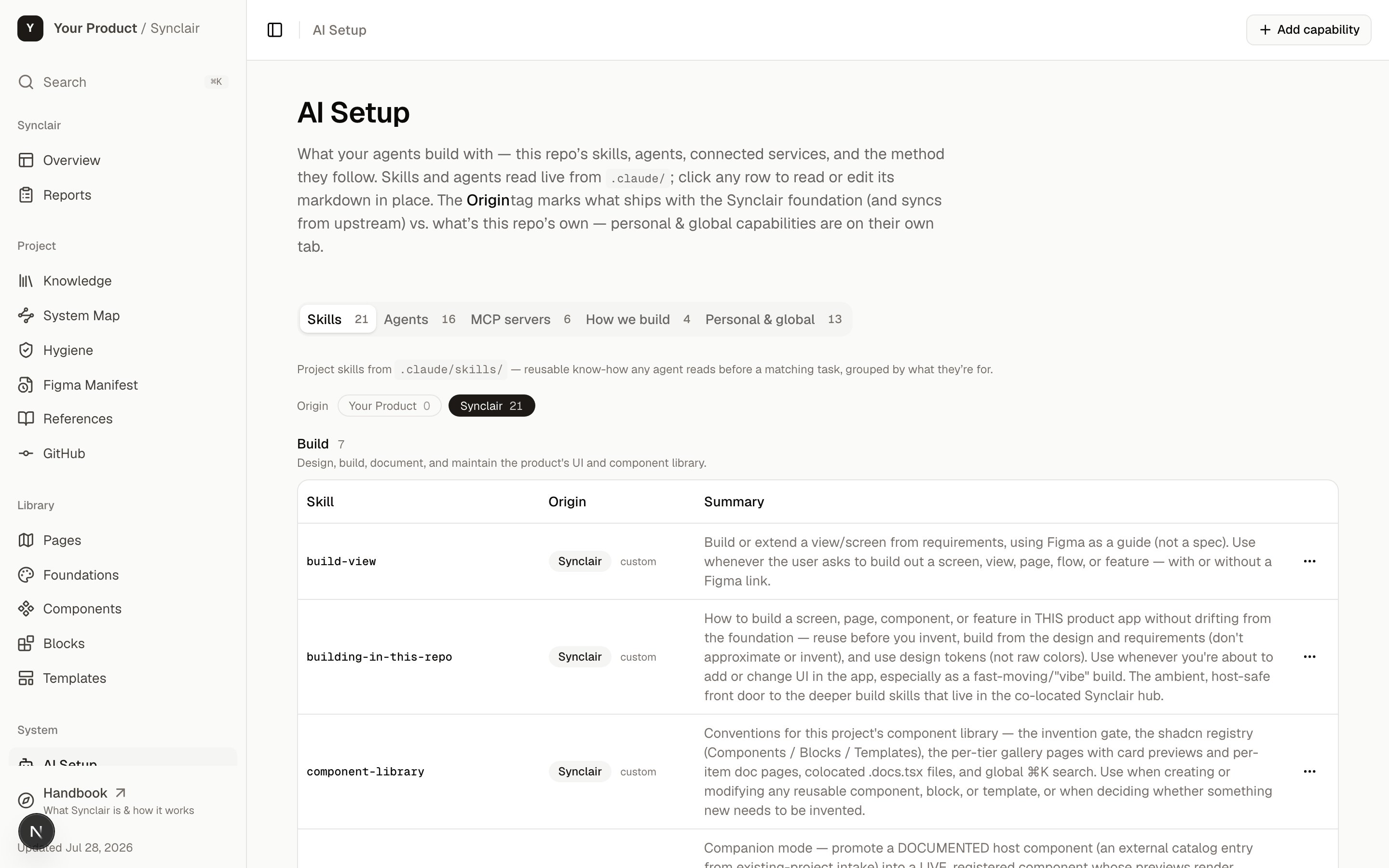
/synclair/ai-setup reads .claude/ live, so the crew on the page is the crew on disk. Every capability is tagged foundation (ships with Synclair, syncs from upstream) or project (yours, never syncs).
Skills — reusable know-how, as plain markdown
A skill is a folder —.claude/skills/<name>/ — with a SKILL.md inside. No
framework, no runtime; it’s just structured markdown any agent can read.
SKILL.md
description— the when. A one-line trigger that says exactly when this skill applies. This is the only part that’s always loaded (see below).- The body — the how: the method, conventions, and rules for the task.
references/*.md(optional) — deep detail that loads only if the body points to it.
Progressive disclosure — why a huge playbook stays cheap
Skills are loaded in three tiers, cheapest first:1
Always loaded — the description (~15 words)
Every skill’s one-line
description sits in context all the time. That’s the whole
cost of a skill until it’s needed.2
Loaded on match — the body
When a task matches the when, the full
SKILL.md body loads. Only then.3
Loaded on demand — the references
Files the body points to (
references/*.md) load only when the body actually reaches
for them.The payoff: a 5,000-line knowledge base costs about 15 words of context until the
moment it’s relevant. That’s what lets Synclair carry dozens of skills without drowning
any single conversation.
How a skill gets used
- Claude Code auto-surfaces skills by their
descriptionand invokes them by name — you don’t open the file first. - Any other agent (Cursor, Copilot, Codex, Gemini, Aider) reads the same
SKILL.mdwhen a task matches its when — the manual version of the same progressive disclosure. - A human browses them on
/synclair/ai-setupand can read any one’s markdown.
AGENTS.md, not a Claude-only file —
every agent reads the same map.
Embedded / co-located mode adds a doorway. Agents open the host repo at its root,
but Synclair’s skills live in the
synclair/ subdir — a place agent tools don’t scan. So
scripts/bridge-agents.mjs copies the ambient skills (those with ambient: true —
product-spec, project-identity, building-in-this-repo) into .claude/skills,
.agents/skills, and .cursor/skills at the host root, and writes an AGENTS.md block
that also points to the deeper build skills and the specialist agents that stay in the
hub. So a coder building anywhere in the product gets the build-guidance + the full map
ambiently, without cd-ing into synclair/. Re-run the bridge after adding an ambient skill.Agents — specialist readers with their own context
An agent (Synclair calls them diggers) is a sub-agent with its own context window. You hand it one narrow job — read this 40-page PRD, survey this codebase, extract this Figma page — and it reads the heavy source in a throwaway context and returns one tight answer.The point is context isolation. The expensive 40-page read happens somewhere you
throw away; only the distilled paragraph comes back to your main conversation. Ten
narrow diggers also beat one know-it-all agent — each returns a sharper answer.
codebase-surveyor, system-mapper, knowledge-harvester,
token-archaeologist, component-cataloger (the existing-app intake crew),
prd-retriever, figma-frame-reader, and reviewers like doc-quality-reviewer.
MCP servers — the tools your agents can reach
Skills and agents are know-how. MCP servers are reach — the connections that let an agent do something outside the repo: pull a frame from Figma, read a PRD in Notion, drive a browser to verify a view. Synclair works both ends of this. It is an MCP server — nine read-only tools over the hub’s own data, on two transports — and it catalogs the servers your project is wired to.Synclair's own MCP server
The nine tools, both transports, how to register it, and what it measurably saves — on
The agent interface.
The servers your project is wired to
Separately, Synclair catalogs the other servers your agents can reach, on the MCP tab of/synclair/ai-setup — each with its connection status and, more usefully, what it’s for
here:
The point of cataloging them is the same as the point of everything else here: a new
teammate — or a new agent session — can see what tooling exists and what it’s for without
asking. An MCP server nobody documented is a capability nobody uses.
lib/synclair-data.ts; the connections themselves are configured in your
agent, not in Synclair.
How skills and agents work together
This is the part that makes Synclair more than a folder of docs. A skill is the recipe; diggers are the prep cooks it sends off. A skill describes a whole task, and where that task needs heavy reading, it dispatches diggers — each reads one source in isolation and returns a digest — and then the main thread acts on those digests. Worked example — populating the hub from an existing app. Theexisting-project-intake skill defines a five-phase intake and dispatches a digger for
each phase:
Each digger reads the host app in its own context and returns proposals; the main
thread writes them into the hub (the catalog, the tokens, the knowledge manifest, the
system map). One skill, five specialist reads, none of which clog the main conversation.
The contract: diggers read and propose; only the main thread writes to the
repo. Skills orchestrate; agents fetch; the main thread decides and commits.
Skill or agent — which is which?
Reach for a skill when…
the guidance should shape what the main agent does inline — a method, a
convention, a checklist it follows in the current context.
Reach for an agent when…
a task needs a heavy read whose bulk you don’t want in the main context — send a
digger and get back just the distilled answer.
How the set is organized
Every skill and agent carries two classifiers, surfaced on/synclair/ai-setup:
category—build·knowledge·intake·foundation·tooling— groups them.layer—foundation(ships with Synclair, syncs from upstream) vs.project(this repo’s own, never syncs) — drives the “Origin” badge.
The gate that keeps the set solid
The set doesn’t stay clean by a size limit — it stays clean by a gate at creation. Before adding a new skill or agent, you have to (1) prove no existing capability covers it — extend or distill into one instead, (2) pick skill-vs-agent by the context-window test above, and (3) declare itslayer + category. That gate lives in the synclair
skill.
The flywheel — capabilities get smarter
It spins from day one: intake distills every source as it’s linked (an undigested manifest entry is unfinished work), and when a later dig surfaces something durable, the digger writes it back into the relevant skill. So the expensive read happens once, up front — every read after is a cheap one-line load. Over time the distilled brain converges on exactly what a builder routinely needs, and raw sources get consulted only for genuinely new detail.The ones worth knowing first
The full set lives in
.claude/skills/ and .claude/agents/, and is browsable on
/synclair/ai-setup — every capability, classified, with an Origin badge, one click
from its markdown.
Next: can I modify all this?
What’s safe to change, what syncs from upstream, and what’s yours forever.