> ## Documentation Index
> Fetch the complete documentation index at: https://docs.synclair.dev/llms.txt
> Use this file to discover all available pages before exploring further.
# Foundations
> The design tokens — color, type, and spacing as one semantic vocabulary that both people and machine checks hold the UI to.
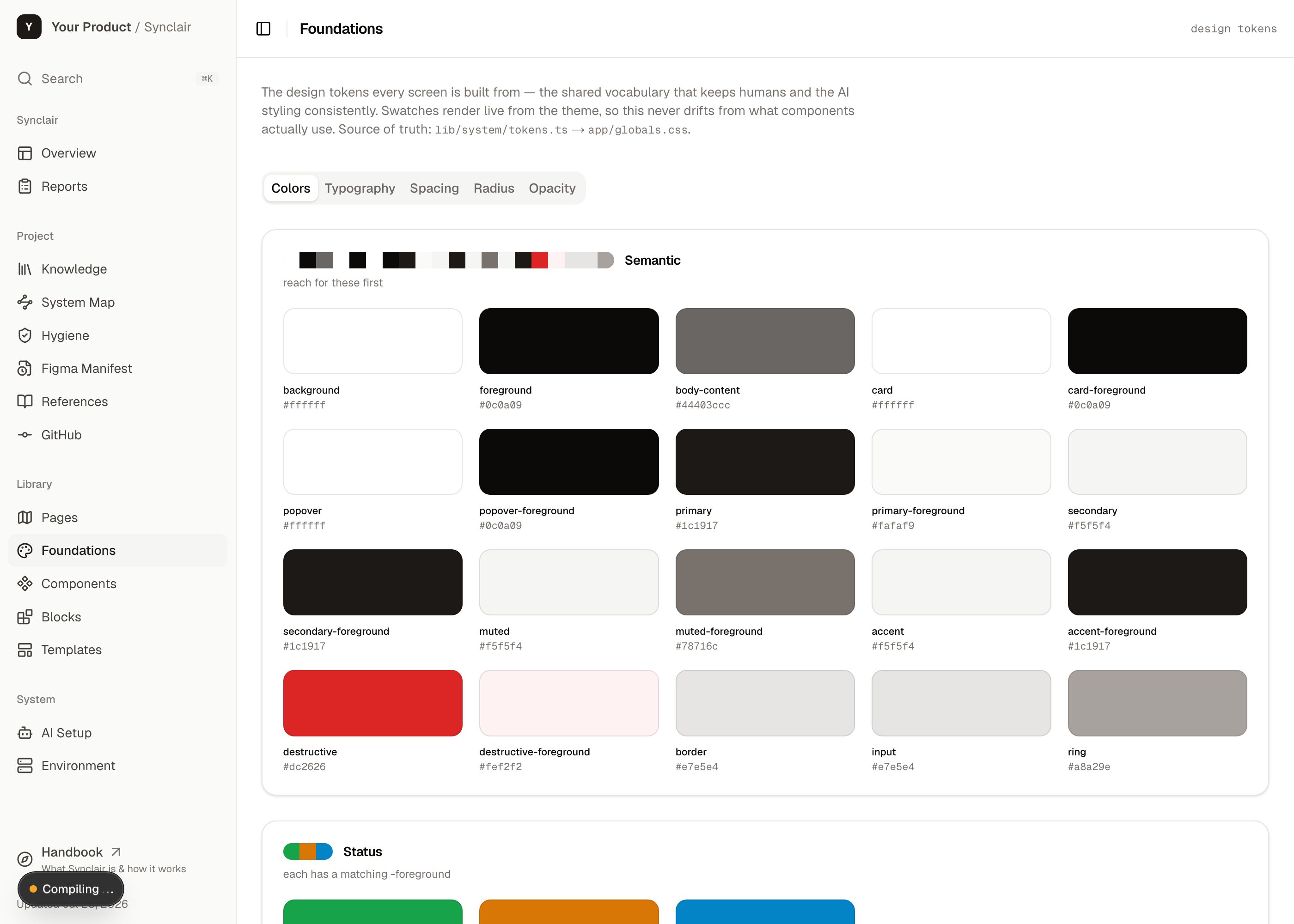
`/synclair/foundations` is the bedrock the rest of the library stands on: the project's
**design tokens**, presented as one browsable, semantic vocabulary. It's where you
answer *"what's our color for a destructive action, and what's the right heading size?"*
— and it's what the lint guardrails point back to when they reject a raw hex.
 ## What it is
The single source of truth for the product's visual language, in three scales:
Semantic roles (primary, muted, destructive, border…) mapped to the brand ramps —
not a wall of hex codes.
The type scale and roles — headings, body, captions — with the real font rendering.
The spacing and radius steps that keep layout rhythm consistent.
## What's in it
* **The token vocabulary** (`lib/system/tokens.ts`) — the *semantic* names, their
meaning, and the usage guidance. Platform-neutral.
* **The brand values** (`lib/system/seed/`) — the actual ramps and theme values for
*this* project. This is the "seed" you swap when you reskin.
* **Foundation example tiles** — a small grid of the product's real UI patterns
(headers, buttons, status pills) rendered against the brand, so the page shows the
tokens *in use*, not just as swatches.
## How it works
The key idea is **semantic, not literal**. You don't reach for `#1c1917`; you reach for
`primary`. That indirection is what lets a reskin be a one-file change and what makes
the tokens meaningful to an agent.
This is **lint-enforced**, not a guideline. Raw hex in a class string, an arbitrary
pixel value, an inline color — the guardrails reject them and the error message names
the token to use instead. A rule firing on legitimate code means the scale is missing a
step — so you add a token, never an `eslint-disable`.
The example tiles live in the **seed** (not the neutral foundation file), which is what
lets the foundation converge with upstream on every sync while the project's own visual
examples stay put — sealed by the `check:foundation-purity` guardrail.
## How to act on it
Reach for the semantic token in your class names (`bg-primary`, `text-muted-foreground`,
`rounded-md`). The Foundations page is the reference for what exists.
Swap the brand ramps in `lib/system/seed/` and the theme values in `app/globals.css`.
Because everything is semantic, the whole hub and library retheme from that one change.
If a guardrail fires on legitimate code, the scale lacks a value. Add a token to
`tokens.ts` + `app/globals.css` (e.g. a new text size) rather than working around it.
Use the `figma-export-tokens` skill to export Figma variables into token files —
the code side of keeping design and code aligned.
Every component in the library is built from these tokens — that's why the guardrails
can keep the whole system consistent.
## What it is
The single source of truth for the product's visual language, in three scales:
Semantic roles (primary, muted, destructive, border…) mapped to the brand ramps —
not a wall of hex codes.
The type scale and roles — headings, body, captions — with the real font rendering.
The spacing and radius steps that keep layout rhythm consistent.
## What's in it
* **The token vocabulary** (`lib/system/tokens.ts`) — the *semantic* names, their
meaning, and the usage guidance. Platform-neutral.
* **The brand values** (`lib/system/seed/`) — the actual ramps and theme values for
*this* project. This is the "seed" you swap when you reskin.
* **Foundation example tiles** — a small grid of the product's real UI patterns
(headers, buttons, status pills) rendered against the brand, so the page shows the
tokens *in use*, not just as swatches.
## How it works
The key idea is **semantic, not literal**. You don't reach for `#1c1917`; you reach for
`primary`. That indirection is what lets a reskin be a one-file change and what makes
the tokens meaningful to an agent.
This is **lint-enforced**, not a guideline. Raw hex in a class string, an arbitrary
pixel value, an inline color — the guardrails reject them and the error message names
the token to use instead. A rule firing on legitimate code means the scale is missing a
step — so you add a token, never an `eslint-disable`.
The example tiles live in the **seed** (not the neutral foundation file), which is what
lets the foundation converge with upstream on every sync while the project's own visual
examples stay put — sealed by the `check:foundation-purity` guardrail.
## How to act on it
Reach for the semantic token in your class names (`bg-primary`, `text-muted-foreground`,
`rounded-md`). The Foundations page is the reference for what exists.
Swap the brand ramps in `lib/system/seed/` and the theme values in `app/globals.css`.
Because everything is semantic, the whole hub and library retheme from that one change.
If a guardrail fires on legitimate code, the scale lacks a value. Add a token to
`tokens.ts` + `app/globals.css` (e.g. a new text size) rather than working around it.
Use the `figma-export-tokens` skill to export Figma variables into token files —
the code side of keeping design and code aligned.
Every component in the library is built from these tokens — that's why the guardrails
can keep the whole system consistent.